Drug and Alcohol Testing Program Management Software by TATSoftApps
Manage DOT and non-DOT testing programs, random selections, consortiums, reporting,
and compliance documentation—all from one powerful Windows desktop application.
Get our drug and alcohol testing management software today and say goodbye to recurring fees/charges forever!

Click me!

Pay once. Manage Drug Testing Forever!

All names, addresses, phone numbers, and email addresses used on this website are fictitious and used for demonstration purposes only.
RandomizeIT!™ Stand-Alone Random Selection Software


RandomizeIT! Random Selection Window
Why Choose RandomizeIT!™ Over Other Random Drug Testing Software?
When it comes to random drug and alcohol testing software, accuracy, compliance, and defensibility are non-negotiable. RandomizeIT! was built specifically for regulated workplace testing programs — not adapted from generic random number generators or spreadsheet tools.
One-time purchase: $1,150—no monthly or annual fees. RandomizeIT™ includes free lifetime support, automatic CSV format detection, professional random-selection reports, and individual notification letters. Runs on Windows 10 and Windows 11.
Have questions before purchasing? Call 850-686-5522, Monday–Friday, 8:00 a.m.–5:00 p.m. Central. We will gladly help you confirm that RandomizeIT™ is right for your organization before you buy.
See how easy it is to create your RandomizeIT import files here!
✔ True DOT-Compliant Random Drug Testing Software
RandomizeIT! ensures compliancy with all governmental agencies, unbiased DOT and non-DOT random selections that meet regulatory standards. No guesswork. No manual manipulation. Just defensible results.
✔ Eliminates Human Bias
Manual spreadsheets and basic randomizers leave room for error and liability. RandomizeIT! uses a proven randomization methodology to ensure impartial, objective selections every time.
✔ Instant Reports & Notification Letters
Automatically generate detailed random selection reports, official notification letters, and audit-ready documentation within seconds.
✔ Built for Employers, TPAs & Clinics
Whether you manage one company or multiple consortiums, this powerful random drug testing program management tool scales with your operation.
✔ One-Time Purchase — No Monthly Fees
Most random drug testing platforms lock you into recurring subscription costs. RandomizeIT! is available for a single, one-time purchase price. You own it. Period.
If your organization is serious about maintaining a compliant, defensible, and professional random drug and alcohol testing program, RandomizeIT! is the smarter choice.
Ready to simplify your random testing process?
Watch the Youtube demo videos, link below, and see how fast compliant random selections can be generated.
Click or stretch to enlarge any screen shot on this page
Quick Demo Video - RandomizeIT!
Not shown in video: Now has Company Directory as well as Employee Directory! Also new - Button to find local collection sites near you!
RandomizeIT™ Random Selection Software Program - Every Import Window and Random Selection Window Button Described in Detail!

RandomizeIT! Random Selection Window — Fast, Accurate, DOT-Compliant
New enhancements since videos both here and on our Youtube channel were created:
Employee Directory and Company Directory store vital information about your employees and companies Also new is the Generate Random Participation Letter Window enhancement. If you are a clinic or medical facility you can now provide your clients with proof of random selection participation with our random participation letter generation.
The heart of RandomizeIT! Stand-Alone Random Selection Software is its powerful and easy-to-use Random Selection Window shown above. Designed specifically for employers, clinics, and C/TPAs who require DOT-compliant random drug and alcohol testing selections, this window delivers scientifically valid, unbiased, and fully defensible results — in seconds.
With complete flexibility, you can generate random selections for:
-
Drug testing
-
Alcohol testing
-
Combined drug and alcohol testing
-
Alternate selections
Whether your program requires percentage-based selections or fixed numbers, RandomizeIT! ensures your process remains accurate, compliant, and audit-ready.
Automatic Notification Letter Generation
After completing a selection, RandomizeIT! can instantly generate individual notification letters for every selected candidate. No separate templates. No manual drafting. Just professional, documented communication ready for distribution.
This saves time while maintaining proper documentation for DOT audits and internal compliance records.
Branded, Professional Random Reports
Want your reports to reflect your organization? Simply fill in the Company / Person Creating Report field, and your name or company name will appear directly on the official random selection report.
Clean. Professional. Branded with Company/person creating report entry field.
Locate Collection Sites with One Click
Need to find a nearby collection site? RandomizeIT! includes a built-in feature that allows you to locate local drug and alcohol testing collection sites with the click of a button — keeping your program efficient and moving forward without delay.
Scientifically Valid & Fully Defensible
RandomizeIT! is built on a true randomization engine that produces unbiased, scientifically valid random selections that stand up to scrutiny. When auditors review your process, you can demonstrate that your selections are:
-
Fully DOT compliant
-
Statistically sound
-
Fair and impartial
-
Documented and reproducible
If you need reliable, stand-alone random drug and alcohol testing software that is fast, compliant, and easy to use — RandomizeIT! delivers.
Accurate. Defensible. Trusted.
And available for a simple one-time purchase.
Our random selection drug testing software is designed to streamline the process of selecting individuals for drug or alcohol testing, allowing you to customize parameters like sample size—either as a fixed number or a percentage of your total population. After conducting the selection, the software generates a detailed report (see screen shots of reports below) listing the individuals who meet the specified testing criteria, along with any alternates if desired. For your convenience, the results are saved in a formatted report for clear presentation. You can also export the results to a .csv file and import into any spreadsheet software such as MS Excel.

See How RandomizeIT™ Fits Your Organization





Give us a call if you have any questions about our Random Selection Software. You can call us at (850) 686-5522. You will be connected with one of our product specialists, not a sales person.
Unlike most other drug testing software companies, we don't hide our software's screenshots from potential customers. We want you to see them!

RandomizeIT! Welcome window

RandomizeIT! Logon window

RandomizeIT!™ Launch Window — Instant Access to What You Need
The moment you log into RandomizeIT! Stand-Alone Random Selection Software, the intuitive Launch Window appears — giving you immediate access to the most important features of your random testing program.
Instead of navigating through complicated menus, the Launch Window allows you to quickly choose exactly where you want to go:
-
Import Window – Easily import employee records (ID, first name, last name, company name (optional))
-
Random Selection Window – Generate fully DOT-compliant random drug and alcohol selections
-
Employee Directory – Manage and search employee records
-
Company Directory – Organize and oversee company information
This streamlined startup design eliminates wasted clicks and gets you directly into action — whether you’re running a new random selection, updating records, or importing fresh data.
For employers, C/TPAs, and drug testing administrators who value speed and efficiency, the Launch Window keeps your random drug and alcohol testing workflow simple, organized, and productive from the very first screen.
Log in. Choose your task. Get to work.
Our RandomizeIT! software is versatile. It can import either 3 values (Employee ID, First Name, and Last Name) or 4 values (Employee ID, First Name, Last Name, and Company Name).

New Enhanced RandomizeIT Import Window
New Import Window Enhancement!
Making Good Software Even Better!
At TATSoftApps LLC, we believe software should continue to improve even after you purchase it. That's why we are constantly developing new features, enhancing existing functionality, improving performance, and making our software even easier to use based on customer feedback and industry needs. As new features are released, you'll have access to them at no additional cost for one full year, ensuring your software stays current with the latest improvements and innovations. Our commitment doesn't end after the sale. We are dedicated to providing exceptional value through continuous product development, outstanding customer service, and ongoing lifetime support. When you choose TATSoftApps LLC, you're investing in software that continues to grow and improve with your business.
Enhanced Import Process – Automatic Import File Column Size Detection
We've simplified the import process by eliminating the need to manually specify whether your import file contains three or four columns. RandomizeIT now automatically detects the file format during the import process and imports the data accordingly. This enhancement reduces user input, prevents import mistakes, and makes importing employee data easier, and more intuitive. Just select your CSV file, and RandomizeIT takes care of the rest.
Note: The screenshots shown below were taken before the enhancement mentioned above was implemented. They still display the previous import window, which included the option to manually select a 4-column import file. In the current version of RandomizeIT, that option has been removed (see screen shot above) because the software now automatically detects whether the imported CSV file contains three or four columns.
RandomizeIT! 3 Value Screen Shots

Random Selection Import Window Before File Selection

Random Selection 3 Value Import File Selection

Random Selection 3 Value - Importing Records Message

Random Selection 3 Value Chosen Import File Successfully Imported

3 Column Random Selections Made - 2 Drug, 3 Alcohol (5% of 70), 2 Drug and Alcohol, and 1 Alternates - Also, Generate Notification Letters Selected

Random Selection Report Generated and Notification Letters Generated

Random Selection 3 Value Random Report Saved

One of the Random Selection Notification Letters
RandomizeIT! 4 Value Screen Shots

Random Selection 4 Value Chosen Import File Successfully Imported
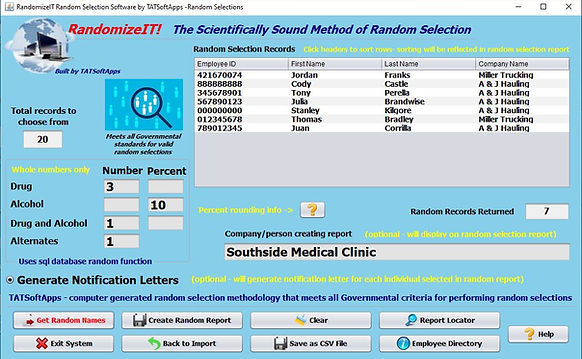
Random Selection 4 Column Random Selections Made - 3 Drug, 2 Alcohol (10% of 20), 1 Drug and Alcohol, and 1 Alternates Chosen

4 Column Random Random Report Generated and Notification Letters not selected

Random Selection 4 Value Random Report Saved

One of the Random Selection Notification Letters

Report Locator Window — Instant Access Without Leaving the Software
RandomizeIT! makes managing your DOT-compliant random selection documentation fast and effortless with the built-in Report Locator Window.
Instead of navigating through Microsoft File Explorer or searching through folders on your computer, the Report Locator allows you to instantly access all reports generated by the software — directly from within the application.
No minimizing windows
No digging through directories
No wasted time
With just a click, you can locate and open:
-
Random selection reports
-
Alternate selection reports
-
Notification letters
-
Participation documentation
-
Other compliance-related reports generated by RandomizeIT!
Everything is organized and accessible from one convenient location, keeping your workflow smooth and efficient.
For employers, clinics, and C/TPAs who need quick access to random drug and alcohol testing records, this feature ensures your documentation is always just seconds away — without ever leaving the software.
Faster access.
Better organization.
Stronger compliance.
That’s the advantage of professional-grade stand-alone random selection software.
Employee and Company Directory Windows
Take complete control of your workforce and client data with the powerful Employee Directory and Company Directory built into RandomizeIT!. Whether you manage in-house employees or operate a clinic performing random selections for multiple client companies, this feature keeps all critical information organized, secure, and instantly accessible in one centralized location.
Easily store and manage vital employee and company details, including contact information, identifiers, and unlimited notes. The flexible notes field allows you to enter as much information as needed — and even cut and paste directly from external sources for maximum efficiency. Need a hard copy? Print directory records instantly for convenient reference, audits, or compliance documentation.
RandomizeIT! doesn’t just perform random selections — it provides a complete organizational tool designed to streamline your drug and alcohol testing program and simplify day-to-day operations.
All names, phone numbers, email addresses, and physical addresses shown in demonstrations are fictitious and used for illustrative purposes only

Add Record to Employee Directory

Employee Directory Window with Quick Name Search and Copy Employee Email Addresses to Clipboard for mass emailing

Add Record to Company Directory

Company Directory Window with Quick Name Search and Copy company Email Addresses to Clipboard for mass emailing

Employee Directory Report

Random Selection Testing Participation Letter Generation Window

Random Selection Testing Participation Letter
CSV File Creation — Flexible Data Integration & Seamless Software Interface
Examples of Comma Separated Value (CSV) Files Used for Import

The comma separated value (.csv) files used for import are easy to create. You can create them from any spreadsheet software (simply save your spreadsheet as a .csv file) or you can use any text editor.
In today’s digital environment, comma-separated value (CSV) files are one of the most widely accepted and versatile data formats available. They allow information to be easily transferred between different systems, spreadsheets, databases, and software platforms without compatibility issues.
TATSoftApps’ Drug and Alcohol Testing Management Software gives you the ability to generate CSV files directly from your system — providing powerful flexibility for data management and integration.
This capability allows you to:
-
Create properly structured CSV files for fast and accurate data imports
-
Transfer employee and testing data between systems with ease
-
Interface with external laboratory systems, HR platforms, or internal databases
-
Maintain standardized data formatting across multiple software applications
-
Reduce manual re-entry and eliminate redundant data entry
Because CSV files are universally recognized by business applications, this feature makes it simple to integrate your drug and alcohol testing program data with other external or internal systems you may already use.
Whether you're importing employee rosters, exporting testing records, or synchronizing with third-party platforms, CSV compatibility ensures your data remains portable, organized, and accessible.
Flexible. Compatible. Efficient.
With TATSoftApps, your drug and alcohol testing software doesn’t operate in isolation — it connects seamlessly with the systems that keep your business running.
At TATSoftApps, we are always here and we always answer our phone should you ever need assistance with any aspect of our software, including the creation of comma separated value files. 850-686-5522.
"This is so much more friendly than the other program we were utilizing. I love this program, it is working great and I must say the customer service ROCK’s as well."
Thanks again.
Andrea L.
Accounting Admin/Project Coordinator
Conductor Power, LLC MN